
Setfacl using LDAP Groups
Setfacl using LDAP Groups
This is the classic scenario of where you have a NFS/Samba share, and you want to make sure that when new Files/Folders are created that they receive the proper permissions for the group, so others in the group have access as well.
login to your file server, and switch to the root user

create a new test directory to test ACL’s
now set permissions as you normally would
in this case we are setting the group to be HR, and giving ONLY root, and members of the HR group access.
BEFORE we do anything, take a look at the default FACL
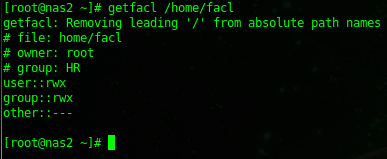
so as we can see, only root/HR has access, now let’s apply the FACL

in this case we are using the -m option to create file mask, d for default, g is the group, in this case it’s the HR group we want to be applied to all new files, and then the permissions is rwx for read/write/execute, and the folder you are applying it to.
now that we have applied the FACL, let’s verify it’s set correctly
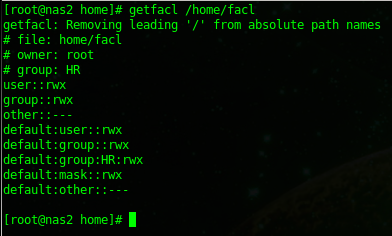
looks good, now let’s create a file to verify it actually works.
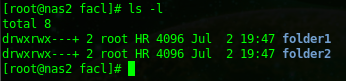
bam! works properly, now any new file/folder created in this folder will inherit the permissions we set.
Set ACL Recursive to sub files/folder
use the -R option
How can i tell if a file/folder has a FACL?
if you do a “ls -l” this will show a tiny “+” at the end of the file/folder
Backups:
if you use Rsync for backups, add the -A option, otherwise it will not backup ACL’s
if you are using TAR for backups, add the –acl option
That’s it!
Hosted Linux Servers at www.zwiegnet.com/go
Related guides: Remove FACL from a Folder/File Recursively | Understanding Linux File Permissions