
Configure TFTP Server CentOS 6
Configure TFTP Server CentOS 6
For this blog, we are going to go over configuring a TFTP server on CentOS 6. This fits the typical example of needing a TFTP server to backup configuration files for networking devices to.
login as root, and issue the following command:

add an account to access the tftp server
set permissions appropriately for the tftp directory
set the service to run on startup, as well as start the service

now edit the tftp configuration file

change disable to no

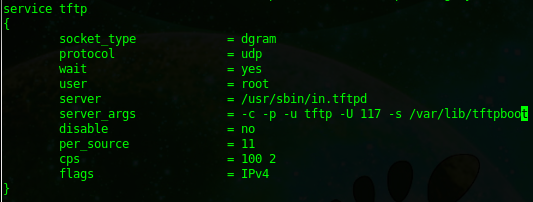
your final configuration file should look as follows, make sure to edit the server_args line as well:
from here use a tftpd client, if it’s not installed do a yum -y install tftp.x86_64
do a test transfer, the syntax is as follows:
Send a File:

Receive a File:
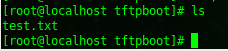
on your server, you should notice that the file transfer completed, and the file to be TFTP’d was uploaded
if you are using Windows 7, add/remove the TFTP client feature, the basic syntax is as follows:

That’s it!
Hosted Linux Servers at www.zwiegnet.com/go
Related guides: Configure Kickstart CentOS 6 | Configure FTP Server CentOS 6