
Find Next FSCK Date CentOS
Find Next FSCK Date CentOS
Linux FSCK runs at what seems random times. It’s specific to EXT filesystems (ext3, ext4) Let’s dig in:
the basic utility to find/update info on FSCK is by using tune2fs
so the basic syntax is “tune2fs -l /path/to/disk-or-volume-group”
the -l switch means list (more details in man tune2fs)

there are four main fields you want to find in the output of this command:
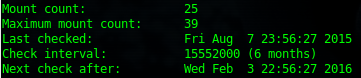
mount count: is the number of times the filesystem as been mounted
maximum count: is the number of maximum mounts before a fsck will occur
check interval: is 6 months, this is how often to check the mount count, so as you can see, Aug to Feb in 6 months.
Next Check After: the next check will occur the reboot after Feb 3 2016, UNLESS the maximum mount count is reached before then.
To skip FSCK on the next reboot:
1. shutdown -rf now
2. $ tune2fs -c 0 -i 0 /path/to/lv, and then verify with: tune2fs -l /dev/mapper/VolGroup00-lv_home | grep Check
That’s it!
Hosted Linux Servers at www.zwiegnet.com/go
Related guides: lv_root: UNEXPECTED INCONSISTENCY; RUN fsck MANUALLY | Mount CentOS Partition from Live CD