
Configure LDAP group for SUDO CentOS 6
Configure LDAP group for LOCAL SUDO CentOS 6
** THERE IS A BETTER WAY TO DO THIS THAT YOU SHOULD CONSIDER**
This blog assumes you have already installed SUDO on your server, and that your server is joined to LDAP
if not, issue yum -y install sudo.x86_64, and run authconfig-tui
at this point, edit your sudoers file using the following command:

you are now editing the sudo config file, go to line 98, or to the area where it shows allowing root to run any command

In this example, we are giving the “sudo” LDAP group access to run root commands

save + quit
now login as a user that’s a member of the SUDO LDAP group
type the word sudo, and then a command that you would only be able to do as root

you should get a nice warning that re-emphasizes your use of root
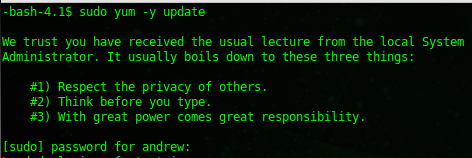
type in your LDAP password, and hit enter
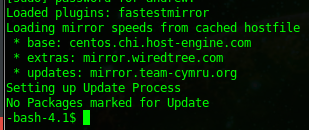
Success, in this case, the command ran as root, all is working!
That’s it!
Hosted Linux Servers at www.zwiegnet.com/go