
389 Sudo LDAP Integration CentOS 6
389 Sudo LDAP Integration CentOS 6
the Sudo schema by default is included in the 389 directory server, all you have to do is configure it to use it.
Server Config (389):
create a new OU called “SUDOers”

Create SUDOers Default Role:
Right-Click on the SUDOers role, and select New → Other → sudoRole, name it “defaults”

Add the attribute for description, and add a nice description

add the attribute “sudoOption” and add the following

this should create the default sudo privileges for all hosts.
Sudo-to-another-user:
sudo command: /bin/su – {username}
(suggestions welcome)
azwieg103 on IRC
Host-Based-Root:
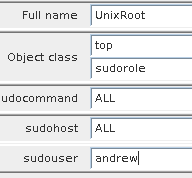
UnixRoot (ALL(ALL) ALL:
** THIS GIVES FULL ROOT ACCESS TO AN ACCOUNT **
create a new role, call it “UnixRoot”
configure the commands to be all, and the host to be all, with the username.
CLI Way:
# UnixRoot, SUDOers, yourdomain.local
dn: cn=UnixRoot,ou=SUDOers,dc=yourdomain,dc=local
sudoUser: somedude
cn: UnixRoot
objectClass: top
objectClass: sudorole
sudoCommand: ALL
sudoHost: ALL
client settings, in this example, we are using SSSD:
vi /etc/nsswitch.conf, and add the following:
sudoers: sss
now edit sssd configuration:
[domain/default]
autofs_provider = ldap
cache_credentials = True
ldap_search_base = dc=yourdomain,dc=local
krb5_realm = EXAMPLE.COM
krb5_server = kerberos.example.com
id_provider = ldap
auth_provider = ldap
chpass_provider = ldap
ldap_uri = ldap://ldapserver1/,ldap://ldapserver2/
ldap_id_use_start_tls = True
ldap_tls_cacertdir = /etc/openldap/cacerts
ldap_tls_reqcert = never
ldap_default_bind_dn = uid=AuthenticationUser,cn=config
ldap_default_authtok = SECRET
ldap_access_filter = (&(object)(object))
ldap_schema = rfc2307bis
ldap_group_member = uniquemember
[sssd]
services = nss, pam, autofs, sudo
config_file_version = 2
domains = default
[nss]
homedir_substring = /home
[pam]
[sudo]
ldap_sudo_search_base = ou=SUDOers,dc=yourdomain,dc=local
sudo_provider = ldap
[autofs]
restart SSSD

and do a test on a host:
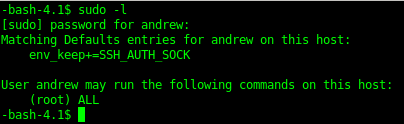
That’s it, you have now configured SUDO in LDAP on 389 Directory Server.
Hosted Linux Server at www.zwiegnet.com/go
Related guides: Limit Sudo to specific commands | Configure LDAP Host Access 389
1 Comment