
Install Docker on CentOS 6
Install Docker on CentOS 6
Docker is an amazing piece of software that allows cross-platform “containers” that can be used in any environment, and are particualarily helpful in eliminating the “it works on XP” or “It works on my MAC” scenario, because applications developed under docker are then cross platform and compatible on the same base, so the OS is irrelevant.
To Install Docker on CentOS, you must first enable to EPEL Repository
http://mirror.pnl.gov/epel/6/i386/repoview/epel-release.html

once the EPEL repository is installed, go ahead and install the docker software

now start the service, and chkconfig so it runs on reboot
by default, docker is run as root, you will need to add developers, or developer groups much like in SUDO

issue a docker pull centos, this should load all CentOS docker images available

this may take a few minutes, issue the following command once completed:

as we can see, we have the latest images for the 3 latest OS versions.
running docker commands:
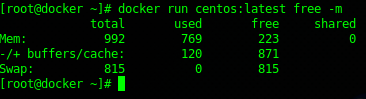
That’s it! Start Dockerizing your Applications!
Hosted Linux Servers at www.zwiegnet.com/go