
Configure DHCP Reservation CentOS
Configure DHCP Reservation CentOS
This blog covers creating a DHCP reservation, or fixed-ip on dhcpd for CentOS Linux. At this point we assume you already have a running DHCP server on CentOS. If you do not, go ahead and click here to get one setup.
Let’s get started, login, and su to root on your DHCP server.
Let’s open the DHCP configuration file
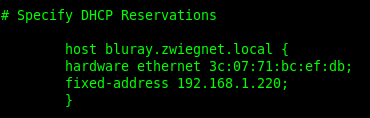
here is an example of a DHCP fixed-ip
as you can see, you put in the hostname, the hardware ethernet (AKA the MAC address) and the fixed address that you want the MAC address to receive when it contacts the dhcp server.
once you have added the changes for your configuration, go ahead and save + quit.

that’s it, you fixed IP should be working now!
Hosted Linux Servers at www.zwiegnet.com/go