
Expand SAN LUN Oracle Linux 6
Expand SAN LUN Oracle Linux 6

at this point, we are assuming that you have a SAN volume on Oracle Linux 6, configured using both of the previous blogs
SERIOUS DATA LOSS CAN OCCUR FROM THIS PROCEDURE, MAKE A BACKUP, WE ARE NOT RESPONSIBLE FOR ANY DATA LOSS, YOU ARE DOING THIS ON YOUR OWN AT THIS POINT!!!
in this demo, we have a 500GB LUN that has filled up, we are expanding it to 600GB.
at this point you need to bring down the database instance, and umount the disk, resize the LUN, and then re-map

from here, restart the iscsi service

if we do a fdisk-l we should see that the LUN has been resized to 633GB (if not, the storage needs to be un-mapped, and then re-mapped on the SAN)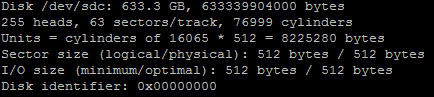
from here we have to do a fdisk

here’s the output
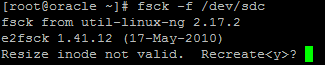
hit yes
you may have to do a few fixes

now run resize2fs

here’s the output
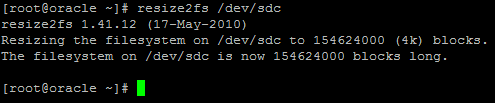
now we just need to re-mount, and verify space
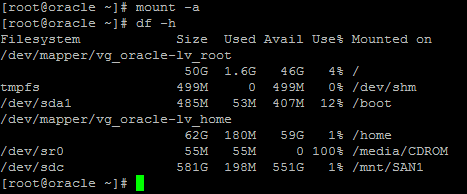
perfect! it’s as expected at this point! Time to bring back up the Databases and go home for the day.
Hosted Oracle Linux at www.zwiegnet.com/go