
Disabling Anonymous Bind 389 Directory Server
Disabling Anonymous Bind 389 Directory Server
It is possible to disable anonymous binds on the 389 Directory Server instance by using LDAP tools to reset the nsslapd-allow-anonymous-access attribute.
** Please make sure to update all of your clients that are using LDAP to contain the BindDN, and PindPW attribute, otherwise applications will stop working. **
Client Config:
add the following to your anonymous LDAP binds, if you have not yet configured these, click here
/etc/nslcd.conf:
binddn uid=authaccount,cn=config
bindpw authpassword
/etc/pam_ldap.conf:
binddn uid=authaccount,cn=config
bindpw authpassword
Server Config:
login, and su to root

change to the /tmp directory, this is a good place to manipulate the LDAP database

as of right now we have anonymous LDAP enabled, we want to check this by running a simple dump of the LDAP database….

now create a new LDIF file called DisableAnonymous.ldif

add the following to the LDIF file:
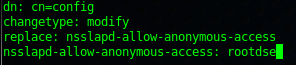
this is the setting that tells LDAP to no longer allow LDAP anonymous binds.
Commit the change using LDAP modify, we are going to use the Directory Manager account, and point it to the DisableAnonymous.ldif file

enter your password, you should see the following:

the final step is to restart the local directory server instance…

now let’s test to make sure anon bind is no longer allowed:

if we open the ldap file, it no longer gives us directory LDAP data….
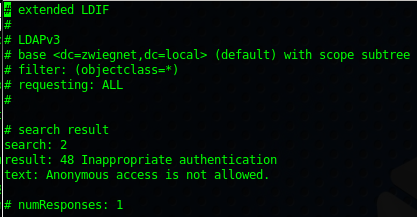
we are now told that Anonymous access is not allowed…..
now let’s perform a search as a bound user….

it works!!!!
Console Login:
for us, we do ssh -X ldapserver, and then type the command 389-console. Once anon bind is turned off, simply using the username “admin” no longer works

in this case, we have to use the full ID for admin for this to work…
uid=admin,ou=Administrators,ou=TopologyManagement,o=NetscapeRoot
That’s it!
Hosted Linux Servers at www.zwiegnet.com/go