
WordPress TLS LDAP Configuration
WordPress TLS LDAP Configuration
For this particular instance, we are authenticating in internal-hosted WordPress site with our Internal LDAP Directory Service using the Secure TLS authenticatin method.
Prerequisites:
php-ldap package installed on LAMP server
restarted httpd service to load new module
Required Package/Plugin:
wpdirauth – WordPress Directory Authentication
Upload the wpDirAuth directory to the /wp-content/plugins/ directory.
- Login to your WordPress instance as an admin user.
- Activate the plugin through the ‘Plugins’ menu in WordPress.
- Go to the
Directory Auth.menu found in the WordPressOptionssection. - Enter your directory server(s) information and set your preferences.
Browse to Settings –> Directory Auth
Part 1:
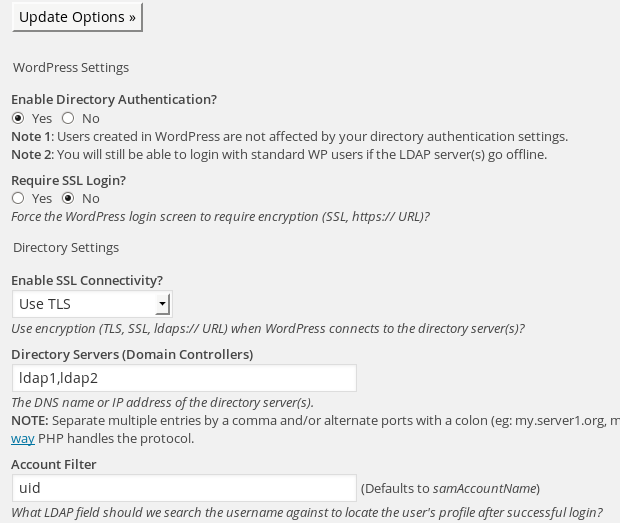
MAKE SURE TO CHANGE samAccountName to uid
part 2:
configure your Base DN, and brand the “YOURDOMAIN” with your organization name
Part 3:
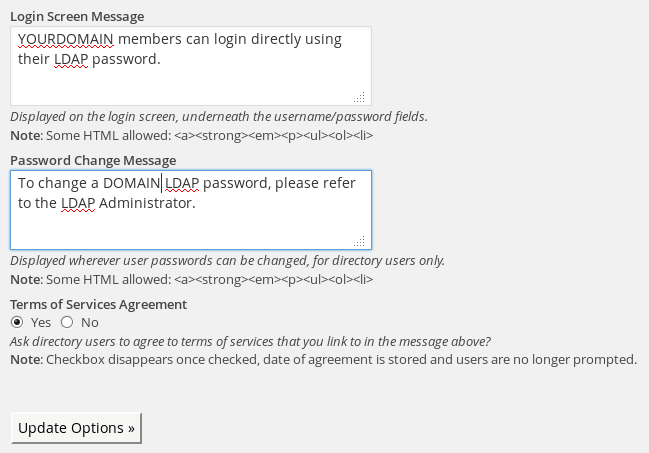
setup your organization name again, and hit “update options”
you now should be able to login with your LDAP username/password!