
Add user to a group OpenLDAP command line
Add user to a group OpenLDAP command line
In this example, we are going to add our user “john smith” to the “Finance” group in LDAP. Here’s the basic steps:
login, and su to root

change to the temp directory where we manipulate our LDAP database

from here take a dump of LDAP

from here let’s edit the ldapdb

we are going to search for the already created Finance group

found it!
now we need to modify this group, so we will write this to a file
do a ctrl +c, and then a :set nu

this shows us the line number

in this case we are going to write line 49 to another file, go ahead and hit ctrl + c, and then enter the following:

this writes lines 49 to a file called Finance. Edit the file

from here we need to make the following modifications:

so basically we are “modifying” the group Finance, and adding member John.
From here all we need to do is commit the change to the database
so basically we are modifying LDAP using the admin account, it will ask for the password, and will make the update with the Finance file.

enter our LDAP password, and BAM, the entry has been modified!
now we need to re-dump LDAP
and now vi the ldapdb

now as you can see, John is a member of the Finance group
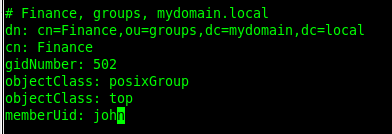
that’s it!
Hosted Linux servers at www.zwiegnet.com/go